Recently, I dedicated quite a lot of room on this blog to the topic of running Phi locally. This time, I want to focus on a different aspect of adopting small language models like Phi - fine-tuning them. I already covered local fine-tuning in the past, so today we are going to do this with Azure Machine Learning (Azure ML).
Azure ML is a comprehensive cloud service for accelerating and managing the machine learning project lifecycle. While local fine-tuning is great, moving to Azure ML makes a lot of sense when you need to scale, and/or when you want to experience the Nvidia GPUs without investing in hardware.
We are going to do LoRA fine-tuning of a Phi-4 model, and then deploy it to a managed batch endpoint for inference.
Prerequisites and the task 🔗
For the demo, we will transform Phi-4 to become a Personally Identifiable Information (PII) extraction engine. The model will be trained to extract PII from text and return it as a structured JSON array containing entities like ADDRESS, NAME, EMAIL_ADDRESS, and PHONE_NUMBER.
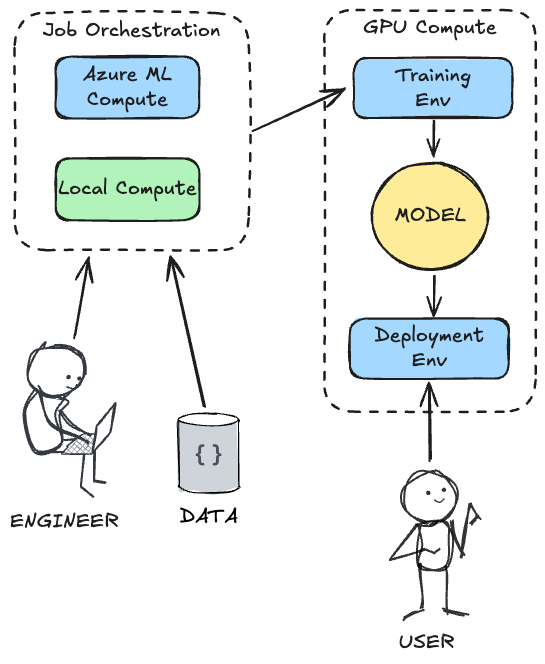
The real value proposition of running this on Azure ML is the separation of concerns: as an engineer, you can orchestrate the entire process from your local machine (or a lightweight cloud VM or even a tablet!), while offloading the heavy lifting to powerful, on-demand GPU clusters. Azure ML handles the provisioning of the training environment, the execution of the training job, the storage of the resulting model, the collaboration of multiple users, and finally, the deployment to a managed environment where users can interact with it.
This means you don’t need to maintain expensive hardware locally, and you get built-in orchestration, data versioning, and a seamless transition from training to deployment.
This architectural separation of concerns can be illustrated as:
Fine-tuning a model like Phi-4 for a task like this is a great way to leverage the power of small language models for a specific, structured data extraction use case. It allows you to create a model that is more accurate and reliable at outputting JSON than the base model.
To follow along, you will need an Azure subscription and an Azure ML workspace - everything else will be provisioned by our code. We will use the Azure ML Python SDK v2 to orchestrate the entire process from a Jupyter Notebook.
You’ll need to set up a .env file with your Azure details:
SUBSCRIPTION_ID=
RESOURCE_GROUP=
WORKSPACE_NAME=

# set it to an existing cluster, if you have one, otherwise choose a cluster name and the code we will write will create a new one for you
CLUSTER_NAME=

# these are needed for a new cluster, they will be ignored if you point to an existing one
VM_SIZE=Standard_NC40ads_H100_v5
MIN_NODES=0
MAX_NODES=1

# these can be whatever you like, as they will be used to create the endpoint and deployment
ENDPOINT_NAME=
DEPLOYMENT_NAME=
The recommended VM for this tutorial is Standard_NC40ads_H100_v5, which has a spec of 40 cores, 320 GB RAM, 128 GB disk and runs H100 GPU (96 GB VRAM). The cost is $9.98/hr per node at the time of writing, billed at second-level granularity.
Please note that GPU-based VMs have to be explicitly enabled in your Azure subscription - which may require contacting Azure support if you haven’t used them before.
Preparation 🔗
In order to get going, we need to prepare the training data, consisting of user inputs and the expected system outputs. We will use a simple JSONL format for this.
Sample extract from our training data (pii_train.jsonl):
{"prompt": "Extract PII: 'Contact Jane Doe at jane.d@email.com or on her mobile 555-123-4567.'", "completion": "[{\"entity\": \"NAME\", \"value\": \"Jane Doe\"}, {\"entity\": \"EMAIL_ADDRESS\", \"value\": \"jane.d@email.com\"}, {\"entity\": \"PHONE_NUMBER\", \"value\": \"555-123-4567\"}]"}
{"prompt": "Extract PII: 'My name is Paul Atreides and I live at 123 Dune Way, Arrakis.'", "completion": "[{\"entity\": \"NAME\", \"value\": \"Paul Atreides\"}, {\"entity\": \"ADDRESS\", \"value\": \"123 Dune Way, Arrakis\"}]"}
{"prompt": "Extract PII: 'All clear here!'", "completion": "[]"}
{"prompt": "Extract PII: 'Send the invoice to john.smith@contoso.com.'", "completion": "[{\"entity\": \"EMAIL_ADDRESS\", \"value\": \"john.smith@contoso.com\"}]"}
Typically a few hundred examples are enough to fine-tune a model like Phi-4 for a specific formatting task. We also need a separate evaluation set (pii_eval.jsonl), which we will use to test the fine-tuned model:
{"prompt": "Extract PII: 'The mission briefing is at 0800 hours.'", "completion": "[]"}
{"prompt": "Extract PII: 'The package should be sent to Dr. Henry Jones, Sr.'", "completion": "[{\"entity\": \"NAME\", \"value\": \"Dr. Henry Jones, Sr.\"}]"}
{"prompt": "Extract PII: 'The artifact is located at Zurich, Switzerland.'", "completion": "[{\"entity\": \"ADDRESS\", \"value\": \"Zurich, Switzerland\"}]"}
Orchestrating with Azure ML 🔗
We will drive the entire process from a Jupyter Notebook. First, we connect to our Azure ML workspace. We then need a compute cluster for our training job. We check if the cluster already exists, and if not, we provision a new one.
from azure.ai.ml import MLClient
from azure.identity import DefaultAzureCredential
from azure.ai.ml.entities import AmlCompute
from azure.core.exceptions import ResourceNotFoundError

ml_client = MLClient(DefaultAzureCredential(), subscription_id, resource_group, workspace_name)

try:
    gpu_cluster = ml_client.compute.get(cluster_name)
except ResourceNotFoundError:
    gpu_cluster = AmlCompute(
        name=cluster_name,
        type="amlcompute",
        size=vm_size,
        min_instances=min_nodes,
        max_instances=max_nodes,
        tier="Dedicated",
    )
    ml_client.compute.begin_create_or_update(gpu_cluster).result()
Next, we upload our local pii_train.jsonl and pii_eval.jsonl files to Azure ML and register them as Data Assets.
from azure.ai.ml.entities import Data

train_data_asset = Data(
    path="./data/pii_train.jsonl",
    type="uri_file",
    name="pii_train_data",
    description="Training data for PII detection.",
)
ml_client.data.create_or_update(train_data_asset)

eval_data_asset = Data(
    path="./data/pii_eval.jsonl",
    type="uri_file",
    name="pii_eval_data",
    description="Evaluation data for PII detection.",
)
ml_client.data.create_or_update(eval_data_asset)
The Training Job 🔗
With the data in place, we can define the training job. We will use a custom Python script (train.py) that leverages the peft library for LoRA fine-tuning and the transformers library from Hugging Face. We point it at microsoft/phi-4 as our base model.
from azure.ai.ml import command, Input, Output
from azure.ai.ml.entities import Environment
import time

custom_job_environment = Environment(
    image="mcr.microsoft.com/azureml/curated/acpt-pytorch-2.2-cuda12.1:latest",
    conda_file="./train/environment.yml",
)

job_name = f"phi4-pii-finetune_{int(time.time())}"

job_command = (
    "python train.py "
    "--model_id microsoft/phi-4 "
    "--train_data ${{inputs.train_data}} "
    "--eval_data ${{inputs.eval_data}} "
    "--model_output ${{outputs.model_output}} "
    "--save_merged_model True "
    "--epochs 3 "
    "--learning_rate 2e-5 "
    "--gradient_accumulation_steps 2 "
)

train_job = command(
    name=job_name,
    code="./train",
    command=job_command,
    inputs={
        "train_data": Input(type="uri_file", path=train_data_asset.path),
        "eval_data": Input(type="uri_file", path=eval_data_asset.path),
    },
    outputs={"model_output": Output(type="uri_folder")},
    environment=custom_job_environment,
    compute=cluster_name,
    display_name="Fine-tune Phi-4 (microsoft/phi-4) for PII Detection",
    experiment_name="phi4-pii-finetuning",
)

returned_job = ml_client.jobs.create_or_update(train_job)
ml_client.jobs.stream(returned_job.name)
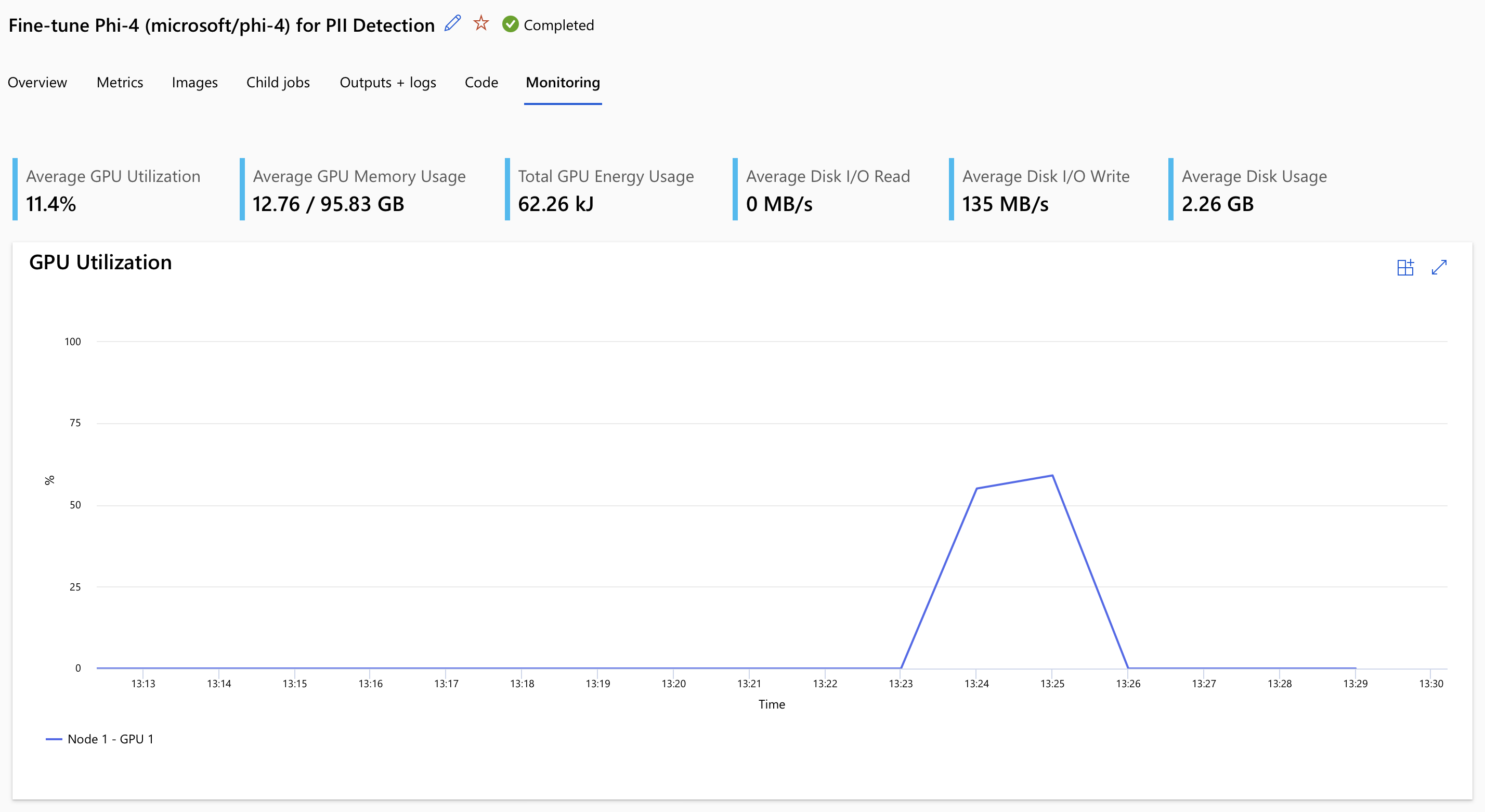
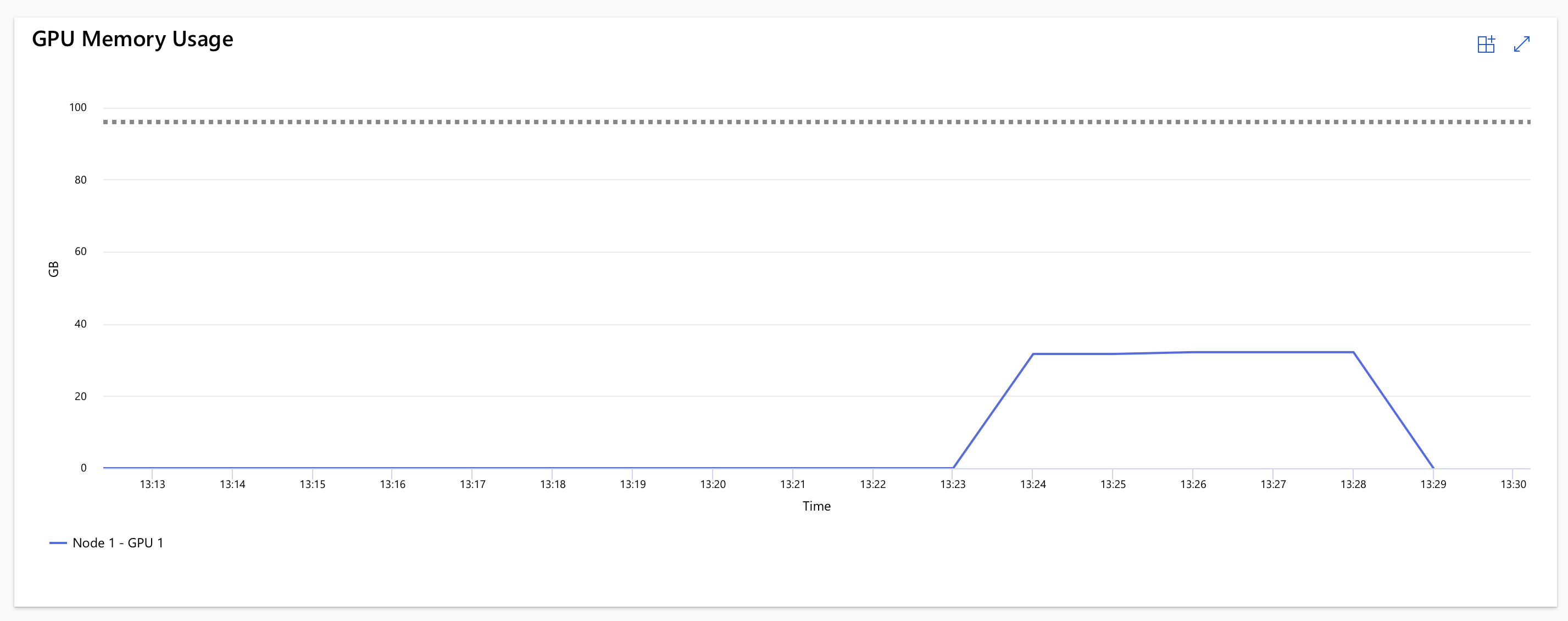
The train.py script handles tokenization, applies a strict system prompt instructing the model to output only JSON, and runs the LoRA training loop. Once the job completes (which will take about 15 minutes - depending on your dataset, compute and whether the GPU cluster is already warm), we can view the job results.
The code is streaming the logs in real-time, so you can see the training progress and any potential issues. Included in that will be the link to the Azure Workspace where you can also inspect the job details, metrics, and outputs.
In our case, the training took ~14 minutes (including startup time), but the actual usage of the H100 GPU was around 6 minutes.
Next, we register the resulting model artifacts in Azure ML for further usage:
from azure.ai.ml.entities import Model

registered_model = ml_client.models.create_or_update(
    Model(
        path=f"azureml://jobs/{returned_job.name}/outputs/model_output",
        name="phi-4-large-pii-model",
        description="Fine-tuned Phi-4 (microsoft/phi-4) for PII detection."
    )
)
Deployment and Inference 🔗
To use our newly fine-tuned model, we will deploy it to an Azure ML Batch Endpoint. This is perfect for processing large datasets asynchronously.
We define a deployment that uses a custom scoring script (score.py). This script loads the model and tokenizer, processes incoming mini-batches of data, and ensures the output is cleanly formatted as a JSON array.
from azure.ai.ml.entities import BatchEndpoint, BatchDeployment, CodeConfiguration, BatchRetrySettings

# Create a unique name for the batch endpoint
batch_endpoint_name = f"pii-batch-{int(time.time())}"

endpoint = BatchEndpoint(
    name=batch_endpoint_name,
    description="Batch endpoint for PII extraction with the fine-tuned Phi-4 model.",
)
ml_client.batch_endpoints.begin_create_or_update(endpoint).result()

deployment = BatchDeployment(
    name="pii-batch-deployment",
    endpoint_name=batch_endpoint_name,
    model=registered_model,
    code_configuration=CodeConfiguration(
        code="./deployment",
        scoring_script="score.py",
    ),
    environment=Environment(
        conda_file="./deployment/environment.yml",
        image="mcr.microsoft.com/azureml/curated/acpt-pytorch-2.2-cuda12.1:latest"
    ),
    compute=cluster_name,
    instance_count=1,
    max_concurrency_per_instance=1,
    mini_batch_size=1,
    logging_level="INFO",
    retry_settings=BatchRetrySettings(max_retries=1, timeout=3600),
)
ml_client.batch_deployments.begin_create_or_update(deployment).result()

# Set the default deployment for the endpoint
endpoint = ml_client.batch_endpoints.get(batch_endpoint_name)
endpoint.defaults.deployment_name = deployment.name
ml_client.batch_endpoints.begin_create_or_update(endpoint).result()
Finally, we can invoke the batch endpoint with our evaluation dataset and download the results:
job = ml_client.batch_endpoints.invoke(
    endpoint_name=batch_endpoint_name,
    input=Input(type="uri_file", path=eval_data_asset.path),
)
ml_client.jobs.stream(job.name)
ml_client.jobs.download(name=job.name, download_path="./batch_results")
The results will be saved as a predictions.jsonl file, containing the original prompts and the structured JSON arrays extracted by our fine-tuned Phi-4 model.
Cleanup 🔗
Once you are done, remember to delete the resources to avoid incurring unnecessary costs. You can delete the endpoint and the compute cluster using the Azure CLI or the portal.
az ml batch-endpoint delete --name <your-endpoint-name> --yes
az ml compute delete --name <your-cluster-name> --yes
You can find the complete source code, including the training and scoring scripts, in the accompanying Github repo. The orchestration notebook is called run_pipeline.ipynb, and the training and scoring scripts are in the train and deployment folders respectively.
Good luck in training your models in the cloud with Azure ML, and stay tuned for more deep dives into the world of small language models and their applications!